
If you’ve been following the AI tooling space, you’ve likely heard about the Model Context Protocol (MCP) — an open standard that lets AI models communicate with external tools and data sources in a consistent, structured way. Think of it as a universal adapter between your application and an AI assistant. And if you’re a Swift developer, MCPSwift by Thomas Kausch is a sample project to get your hands dirty with MCP for the first time.
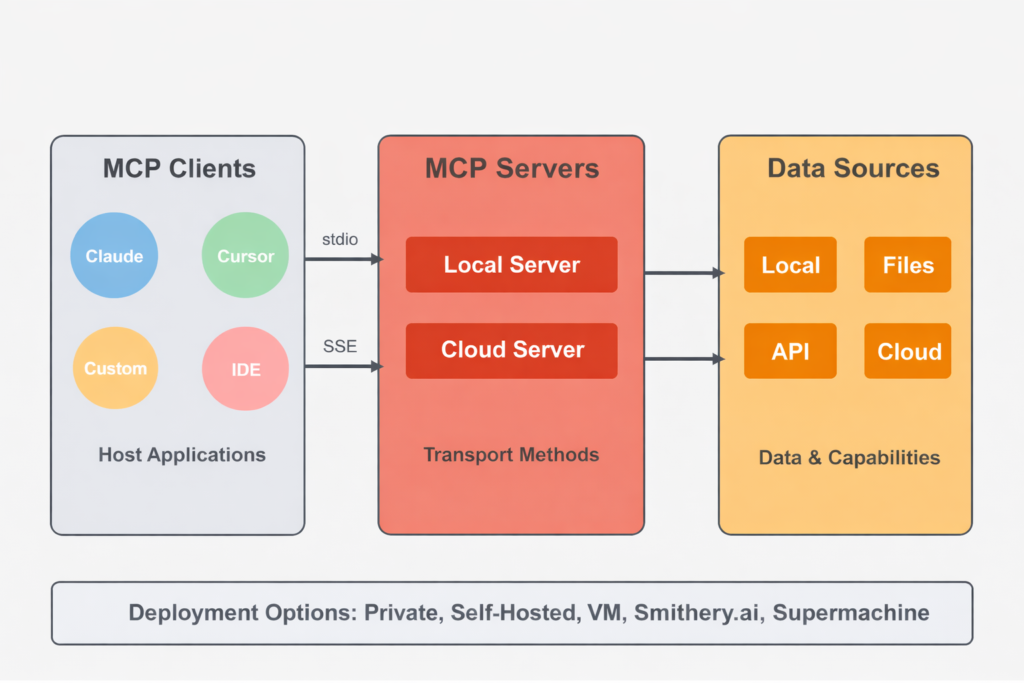
What is the Model Context Protocol?
MCP defines a standardized way for AI models to interact with local and remote resources — files, APIs, databases, shell commands — without each integration needing bespoke plumbing. Instead of an AI tool knowing how to call your specific API, MCP provides a common language: the AI client makes requests, and your MCP server handles them.
The protocol separates two roles clearly:
- MCP Server — your code, which exposes tools, resources, and prompts that an AI can call.
- MCP Client — the AI-powered application (like Claude Desktop, Cursor, or VS Code’s agent mode) that connects to your server and uses its capabilities.
Communication happens over a transport layer — typically stdio for local servers, or HTTP/SSE for networked ones.
Why Swift?
Swift is no longer just an Apple platform language. With Swift 6’s improved concurrency model (async/await, actors) and Linux support, it’s a genuinely compelling choice for writing backend tooling and command-line utilities. An MCP server is, at its core, a small, long-running process that reads from stdin and writes to stdout — a perfect fit for a Swift executable.
Anthropic’s official swift-sdk provides the foundation, and MCPSwift builds a minimal, approachable example on top of it.
What is MCPSwift?
MCPSwift is a Hello World MCP server written in Swift. It demonstrates the minimal scaffolding you need to:
- Create a Swift Package Manager executable
- Import the MCP Swift SDK
- Declare a server with a tool
- Start the server over
stdiotransport
That’s it. No databases, no networking, no complex state — just the essence of what an MCP server is.
The Core Concepts in Code
A minimal Swift MCP server looks roughly like this:
import Foundation
import MCP

// 1. Create the server
let server = Server(
name: "HelloWorldServer",
version: "1.0.0",
capabilities: .init(tools: .init(listChanged: false))
)

// 2. Register a tool handler
await server.withMethodHandler(ListTools.self) { _ in
ListTools.Result(tools: [
Tool(name: "greet", description: "Says hello", inputSchema: …)
])
}

await server.withMethodHandler(CallTool.self) { params in
CallTool.Result(content: [.text(.init(text: "Hello, World!"))])
}

// 3. Start listening over stdio
let transport = StdioTransport()
try await server.start(transport: transport)
try await server.waitUntilCompleted()
The StdioTransport means any MCP-compatible client can launch this executable as a subprocess and communicate with it through standard input/output — no ports, no configuration.
Why This Matters
The value of a Hello World project isn’t what it does — it’s what it teaches. MCPSwift shows you the minimum viable surface area of an MCP server in Swift:
- How to structure the
Package.swiftwith the official SDK dependency - How tool registration and dispatch work
- How the stdio transport lifecycle behaves with
async/await - How Swift’s structured concurrency maps naturally onto the async, message-driven MCP protocol
Once you understand the shape of this minimal example, extending it to real tools — querying a database, running a shell command, reading files from disk — becomes a matter of adding cases, not rethinking architecture.
The Bigger Picture
MCPSwift sits in a growing ecosystem of Swift MCP tooling. Other projects like Cocoanetics/SwiftMCP provide macro-based ergonomics with @MCPTool, while sebsto/mcpserverkit wraps the official SDK with higher-level abstractions. But before reaching for those, starting with a raw Hello World like MCPSwift is the right move — it builds intuition that makes the abstractions make sense.
For iOS and macOS developers, MCP represents a compelling bridge between the apps you build and the AI assistants your users rely on. Writing your first MCP server in Swift, your native language, is a natural place to start.
Getting Started
- Repository: github.com/tkausch/MCPSwift
- Official Swift SDK: github.com/modelcontextprotocol/swift-sdk
- MCP Documentation: modelcontextprotocol.io
- Claude Desktop Config Guide: docs.anthropic.com
If you’re a Swift developer curious about AI tooling, MCPSwift is the fastest path from zero to a working MCP server. Clone it, run it, and then start thinking about what your tools would expose.
