
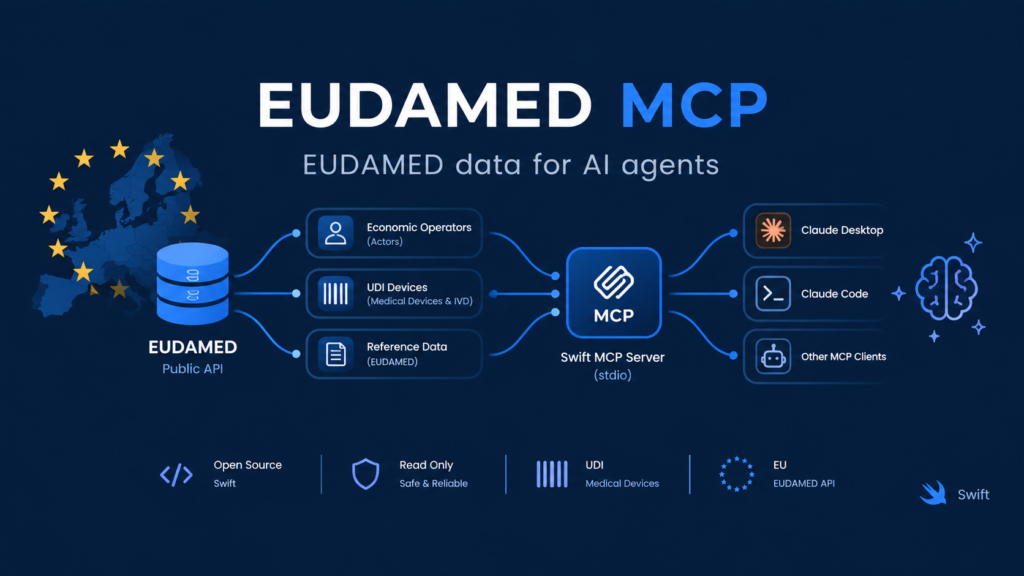
If you work in medical device regulation, you know EUDAMED, the EU’s registration database for medical devices and in vitro diagnostics. It holds manufacturers, authorised representatives, importers, and UDI device records. It’s also built for humans clicking through a web UI, not for AI agents.
I wanted to see how far I could get by putting a Model Context Protocol (MCP) server in front of the public EUDAMED API, so that Claude and other MCP clients can answer questions like “Which Class III devices does this manufacturer have registered?” with real registry data instead of guesses.
The result is eudamed-mcp, written in Swift.
Why Swift?
I’ve been writing Swift for years, and I wanted to know whether it holds up as a server-side language for MCP. It does, for three reasons:
- One binary, two modes. The same executable runs over stdio for local clients (Claude Desktop, Claude Code) and as an HTTP server (
eudamed-mcp serve) for remote use. - Small, predictable deployment. A multi-stage Docker build compiles in a Swift image and runs in a slim one.
- Strong typing around messy data. EUDAMED responses are full of numeric ids, nested structures, and optional fields. Swift’s type system catches many mistakes at compile time.
Don’t rebuild the client
The server doesn’t talk to EUDAMED directly. It wraps EudamedClient from my own eudamed-public library, which already handles three annoying parts: pagination, retries, and resolving numeric ids to human-readable reference labels.
That last one matters more than it sounds. If a tool returns riskClass: 14, the model has to guess what 14 means. Resolving it to the real label before it reaches the model makes answers far more reliable.
The tool surface
Six tools, all read-only (the public API has no write operations and needs no authentication):
| Tool | Purpose |
|---|---|
search_actors | Find manufacturers, authorised representatives, importers, and competent authorities by name, type, or country |
get_actor | Fetch one actor by its exact UUID |
search_udi_devices | Search devices by identifiers, names, manufacturer, risk class, or legislation |
get_udi_device | Fetch one device by its exact Primary DI |
search_reference_data | Browse lookup tables such as risk classes, legislations, and statuses |
get_reference_value | Resolve a single reference value |
The split between search_* and get_* is deliberate. A model typically searches first, picks a candidate, and then fetches the full record. Keeping those steps separate gives it smaller, more focused responses to reason over.
Stateless HTTP transport
For remote use I chose the SDK’s stateless Streamable HTTP transport. Every request is handled independently, with plain JSON responses and no sessions. The practical benefit is that you can run several instances behind a load balancer without sticky routing. The trade-off is that GET /mcp returns “Method Not Allowed” because there is no SSE stream. That is expected, and clients like MCP Inspector fall back to plain POST.
Two endpoints are all you need:
POST /mcpis the MCP endpointGET /healthreturnsok, for load balancer and platform health checks
Securing a public endpoint
Once you bind to 0.0.0.0, anyone who knows the URL can call your server. Two environment variables handle this:
EUDAMED_MCP_TOKEN=change-me
  .build/release/eudamed-mcp serve --env production --hostname 0.0.0.0 --port 8080
EUDAMED_MCP_TOKENrequiresAuthorization: Bearer <token>on/mcp. If you leave it unset, the endpoint is open.EUDAMED_MCP_ALLOWED_HOSTSrestricts acceptedHostheaders as protection against DNS rebinding.
The server speaks plain HTTP, so TLS comes from a reverse proxy or the hosting platform.
Deploying to Railway
Railway builds the Dockerfile and serves the app over HTTPS, and the whole deployment is a handful of commands:
brew install railway
railway login
railway link
railway variables --set "EUDAMED_MCP_TOKEN=$(openssl rand -hex 32)"
railway up
railway domain
Three things bit me along the way, so here they are:
- Railway only auto-detects a file named exactly
Dockerfile. I started with aContainerfile. Railway didn’t see it, fell back to its automatic builder, and told me Swift isn’t supported. Naming the fileDockerfilefixed it. SettingRAILWAY_DOCKERFILE_PATHis the alternative if you want to keep a different name. - Bind to
0.0.0.0and respectPORT. Railway injects the port. A server on127.0.0.1, or one that hardcodes the wrong port, gives you a deployment that looks healthy and returns 502. - Set the health check path to
/health. Railway then switches traffic to a new deployment only once it responds.
Swift builds in Docker are slow, so expect the first deploy to take a few minutes.
Connecting a client
With Claude Code:
claude mcp add --transport http eudamed https://<your-domain>/mcp
  --header "Authorization: Bearer <token>"
On claude.ai, add it as a custom connector with the same URL. For local use, point your client config at the built binary and it runs over stdio.
Testing with MCP Inspector
Before wiring up a real client, I test with MCP Inspector. The CLI mode is handy for quick checks:
npx @modelcontextprotocol/inspector --cli http://localhost:8080/mcp
  --method tools/list

npx @modelcontextprotocol/inspector --cli .build/debug/eudamed-mcp
  --method tools/call --tool-name search_actors
  --tool-arg "name=Roche Diagnostics GmbH"
What I learned
- Resolve ids before the model sees them. This did more for answer quality than any prompt tweaking.
- Keep tools narrow. Six focused tools beat one “do everything” tool.
- Stateless is a gift. No session handling means simpler code and trivial horizontal scaling.
- Read the platform’s detection rules. One filename cost me more time than any Swift code.
What’s next
Regulatory data is a good fit for agents: it’s structured and public, and people constantly need to cross-reference it. I’m exploring where this goes beyond a single registry, such as combining EUDAMED with other regulatory sources.
The code is on GitHub. It’s licensed under PolyForm Noncommercial 1.0.0, and the underlying eudamed-public library has commercial licensing options. If you work with EUDAMED data or MCP in Swift, I’d like to hear from you.
