
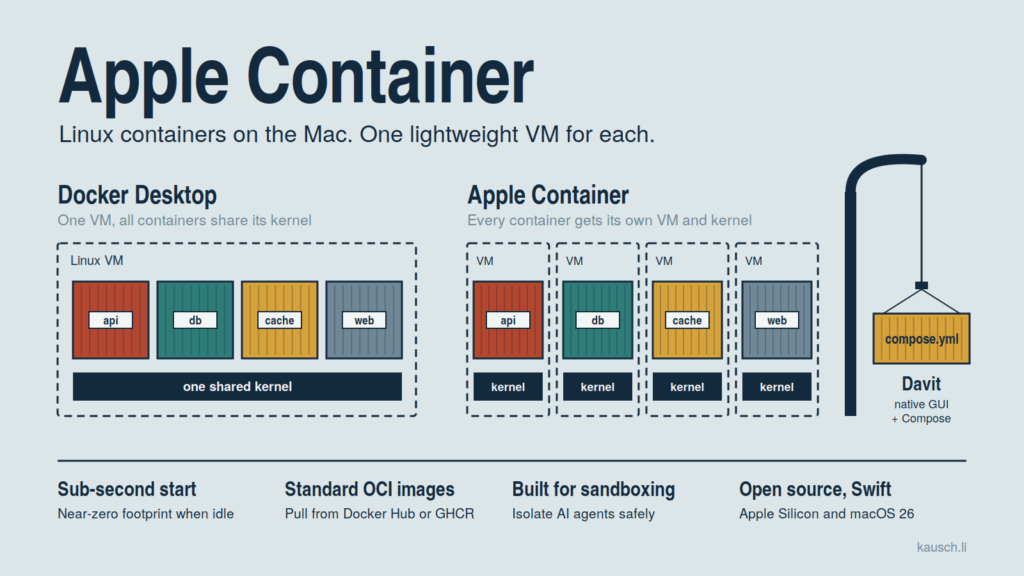
For years, the answer to “how do I run Linux containers on my Mac?” was obvious: install Docker Desktop, OrbStack, or Colima. Apple has now changed that. On June 9, 2026, Apple released version 1.0.0 of container, its Swift-native tool for running Linux containers on Apple Silicon. It is open source under the Apache 2.0 license and requires macOS 26.
The Big Difference: One VM per Container!
Docker Desktop on the Mac starts a single Linux VM. All containers share that VM’s kernel and are separated from each other via namespaces and cgroups.
Apple takes a different approach. The Containerization framework runs every Linux container inside its own lightweight virtual machine. Isolation happens at the hardware level instead of relying on a shared kernel. The whole thing is built from scratch, optimized for Apple Silicon, and written in Swift.
You might expect that many VMs to feel heavy. According to early reports, it’s the opposite: containers start in under a second, the root filesystem is minimal, and the idle footprint is close to zero.
Switching over is easy because your images stay the same. container is OCI-compatible, so it pulls from and pushes to Docker Hub or the GitHub Container Registry. The BuildKit-based builder lets you build your own images, and amd64 images run via Rosetta.
container system start
container run -d --name web -p 8080:80 nginx
container build -t my-app .
Where It Really Shines
Working safely with third-party dependencies. npm, pip, or SPM packages can be compromised. Because each container runs in its own VM, a malicious package has a much harder time reaching your host or other containers.
Sandboxing AI coding agents. For me, this is the most exciting use case. AI assistants increasingly modify files on their own. A container limits them to their intended scope and protects against accidental damage or leaking sensitive data. Letting an agent loose inside a VM feels a lot more relaxed than letting it loose in your home directory.
Local backend development. Spin up Postgres, Redis, or a Swift-on-Server backend locally without a heavyweight Docker daemon draining your battery. Docker’s multiple layers of isolation and virtualization can cost a lot of energy. OrbStack does better, but it can’t get as close to the system as Apple’s own framework.
Building container features into your own apps. Behind the CLI sits a Swift framework with APIs for OCI images, registries, ext4 filesystems, networking, and spawning lightweight VMs via Virtualization.framework. That makes it possible to build dev tools, test runners, or internal utilities that integrate Linux containers natively.
Persistent Linux environments. Version 1.0 adds container machine for persistent Linux dev environments – perfect for reproducing Linux builds or CI steps locally.
Davit: The Missing Piece
Davit is an open-source, native macOS app for Apple’s container platform. Think OrbStack or Docker Desktop, but built for Apple’s VM-per-container stack. The name fits: a davit is the crane on a ship that lifts cargo and small boats over the side.
Davit is written entirely in SwiftUI. It uses Apple’s own ContainerAPIClient library and talks to container-apiserver directly over XPC, the same path the CLI uses.
The highlight is Compose import. Open a docker-compose.yml, and Davit first shows you a preview of what it will create: services in depends_on order, named volumes, networks, the equivalent container run command for each service, and warnings for anything unsupported. Then it starts the whole stack in one click. It supports healthchecks, profiles, depends_on conditions such as service_healthy, env_file, entrypoint, and ${VAR} interpolation from a sibling .env file.
There is a headless mode as well, so it also works in the terminal and in scripts:
davit compose plan docker-compose.yml
davit compose up docker-compose.yml
Davit also solves a practical problem: Apple’s platform DNS can’t resolve Compose service names. To fix this, Davit writes managed /etc/hosts entries into each running container of the project, mapping service names to their current IPs.
Beyond Compose, you get what you’d expect from a desktop container tool: a dashboard with live CPU charts, building images from a Dockerfile via Apple’s BuildKit builder, and one-click shells into running containers. You can also browse a container’s filesystem and sign in to private registries, with credentials stored in the Keychain.
Conclusion
I use Apple Container every day now, and it has quietly replaced Docker Desktop in my workflow. It’s not just Docker with an Apple logo. It’s a genuinely different design: every container gets its own VM, it barely touches my battery, and it feels like part of macOS rather than something bolted on. The piece I was missing was Compose, and Davit fills that gap well enough that my existing stacks just run. If you’re on Apple Silicon, give it a try, especially if you let AI agents or untrusted code loose on your machine.
